個人で運営している Linux サーバーは、メモリが限られているため kdump を無効化し、その分アプリケーション向けにメモリを割り当てるようにしています。
その手順については以前の記事で紹介しました。
ただ、最近構築したものに関して、使用可能メモリが少なく、crashkernel にメモリが付与されている状態でした。
原因を調査したところ、Red Hat Enterprise Linux 9.3 のリリースノートより、grub2-mkconfig コマンドの挙動が変更されていることを確認しました。
これまで GRUB_CMDLINE_LINUX を変更後に反映させるコマンドは
grub2-mkconfig -o /boot/grub2/grub.cfg
でよかったものの
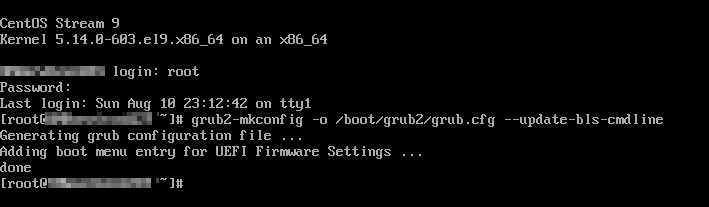
grub2-mkconfig -o /boot/grub2/grub.cfg --update-bls-cmdline
のように「update-bls-cmdline」オプションを付与する必要がでてきました。
grub2-mkconfig –help の結果は下記です。
# grub2-mkconfig --help
Usage: grub2-mkconfig [OPTION]
Generate a grub config file

  -o, --output=FILE       output generated config to FILE [default=stdout]
  --no-grubenv-update     do not update variables in the grubenv file
  --update-bls-cmdline    overwrite BLS cmdline args with default args
  -h, --help              print this message and exit
  -V, --version           print the version information and exit

Report bugs to <[email protected]>.
CentOS Stream 10 でも同様の内容でしたので、RHEL 10 系でも同様の挙動と思われます。
ちなみに、RHEL 8.10 互換の Oracle Linux 8.10 ではこのオプションは使えませんでした
$ grub2-mkconfig -o /boot/grub2/grub.cfg --update-bls-cmdline
Unrecognized option `--update-bls-cmdline'
Usage: grub2-mkconfig [OPTION]
Generate a grub config file

  -o, --output=FILE       output generated config to FILE [default=stdout]
  --no-grubenv-update     do not update variables in the grubenv file
  -h, --help              print this message and exit
  -v, --version           print the version information and exit

Report bugs to <[email protected]>.
まとめ
Red Hat Enterprise 9.3 系以降は GRUB_CMDLINE_LINUX 編集後、grub2-mkconfig の実行時に –update-bls-cmdline が必要になりました。
GRUB_CMDLINE_LINUX 更新したのに反映されていない?というときは一度ご確認ください。